
Why freelancers don't need accounting software
When you search for invoicing solutions, you'll find dozens of tools marketed at small businesses. QuickBooks, Xero, FreeAgent, Sage — they're powerful platforms used by companies with employees, payroll, inventory, and complex finances.
But if you're a freelancer? You probably don't need any of that. You need to send invoices, track whether clients have paid, and pull together numbers for your tax return once a year. Full accounting software is overkill — and the learning curve steals time from actual work.
That's where dedicated invoicing software comes in. It handles exactly what freelancers need: professional invoices, client records, payment tracking, and basic reporting. No journal entries. No bank feeds to reconcile. No features you'll never use cluttering your screen.
What freelancers actually need from invoicing software
After talking to hundreds of UK freelancers, the requirements are remarkably consistent. You don't need dozens of features — you need a few things that work reliably:
Quick invoice creation
Every invoice follows roughly the same structure. Your details, client details, what you did, how much you charge. Good invoicing software remembers your settings, stores client information, and generates invoice numbers automatically. Creating an invoice should take under a minute.
Professional appearance
First impressions matter. Your invoices represent your business. Clean design, your logo, consistent formatting — these signal professionalism even before the client reads the details. Most invoicing software includes templates that look far better than anything you'd create in Word.
Payment tracking
Knowing who owes you money shouldn't require a spreadsheet. At a glance, you should see: total outstanding, which invoices are overdue, and what's been paid this month. When a client pays, one click updates the status and your totals.
Client management
You'll invoice the same clients repeatedly. Storing their details once means you never retype addresses, set payment terms each time, or wonder "what email did I use for that company?" Good invoicing software builds a client list automatically as you work.
VAT handling
If you're VAT-registered, your invoices need VAT numbers, rates, and amounts. If you're not, you need to clearly state that VAT isn't applicable. Invoicing software handles this automatically based on your settings.
Invoicing software vs accounting software: the comparison
Here's how dedicated invoicing software compares to full accounting platforms:
Dedicated invoicing software
- ✓ Fast to set up (minutes, not hours)
- ✓ Simple interface focused on invoicing
- ✓ Lower cost (often free for core features)
- ✓ No accounting knowledge required
- ✓ Perfect for sole traders and freelancers
Full accounting software
- ✓ Double-entry bookkeeping
- ✓ Bank reconciliation
- ✓ Full financial reporting (P&L, balance sheets)
- ✓ Payroll and multi-user access
- ✗ Steeper learning curve
- ✗ Higher monthly costs
- ✗ Many features irrelevant to freelancers
If you're a one-person business without employees, dedicated invoicing software covers your needs at a fraction of the complexity and cost.
How FreelancerHub works for freelancers
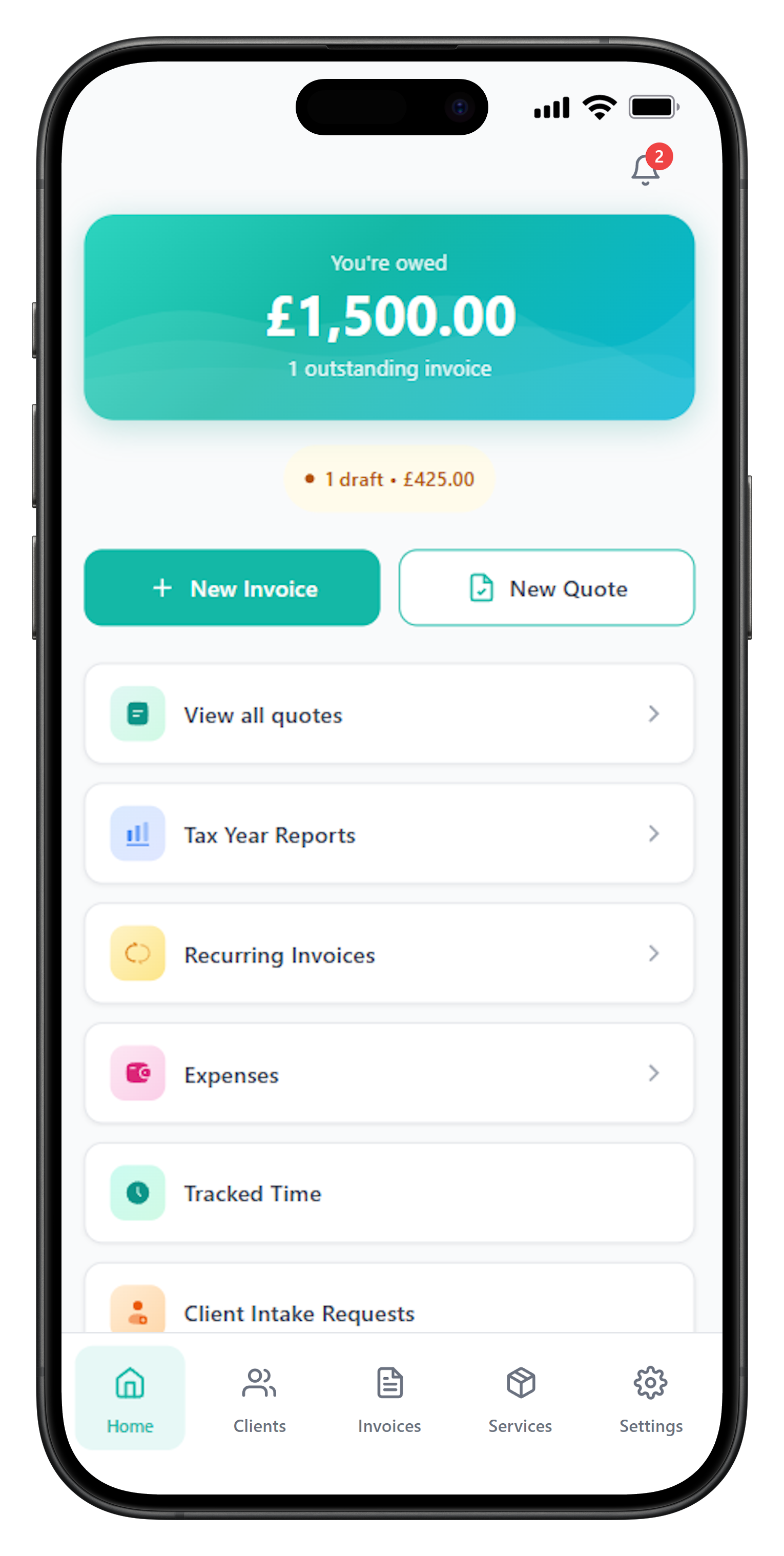
FreelancerHub is invoicing software built specifically for UK freelancers. No accounting bloat, no features you won't use. Just sensible tools that help you get paid.
Create professional invoices
Add your branding, enter line items, and generate polished invoices in seconds. PDF export and direct email included.
Send and convert quotes
Create quotes for prospective work. When clients accept, convert to invoice with one click — no re-entering details.
Manage clients
Store client details, set per-client payment terms and currency. See complete history of invoices per client.
Track what you're owed
Dashboard shows outstanding amounts, overdue invoices, and payment history. No spreadsheets needed.
Handle VAT correctly
VAT registered? Invoices include your number, rate, and amounts automatically. Not registered? Totals show clearly without VAT.
UK tax year summaries
Generate reports for the UK tax year (April to April) when Self Assessment time comes around.
Who uses dedicated invoicing software?
Freelance invoicing software is popular across industries where people work independently and bill clients directly:
- Developers and programmers — billing day rates, project fees, or retainers
- Designers — invoicing for branding projects, web design, or ongoing creative work
- Writers and editors — charging per word, per article, or monthly retainers
- Consultants — billing for advisory work, workshops, or strategy projects
- Photographers and videographers — project-based invoicing with clear deliverables
- Marketing freelancers — campaign work, SEO projects, social media management
The common thread: people who need professional invoices without the administrative overhead of running a larger business.
Signs you've outgrown spreadsheets
Many freelancers start with manual invoices or Word templates. That works fine initially, but there are clear signs it's time to upgrade:
You're losing track of payments. If you regularly have to check bank statements to figure out what's been paid, you need proper invoice tracking.
You've made calculation errors. Manual VAT calculations or adding up line items leads to mistakes. Embarrassing at best, costly at worst.
Invoicing feels like a chore. When you delay invoicing because it takes too long, you're delaying getting paid. Faster invoicing means faster payment.
Tax time is stressful. Hunting through emails and folders to compile your annual income figures is a sign you need organised records.
You've reused an invoice number. This creates compliance problems and looks unprofessional. Invoicing software prevents this entirely.
Frequently Asked Questions
What's the difference between invoicing software and accounting software?
Invoicing software focuses on creating, sending, and tracking invoices. Accounting software handles double-entry bookkeeping, bank reconciliation, profit & loss statements, and full financial reporting. For most freelancers, dedicated invoicing software is simpler, cheaper, and covers everything you actually need day-to-day.
Do I need invoicing software as a freelancer?
If you invoice clients regularly, yes. Manual invoicing in Word or Excel works initially, but it doesn't scale. You'll spend more time on admin, make more mistakes, and struggle to track what's been paid. Purpose-built invoicing software saves time and ensures you get paid faster.
Can I use invoicing software alongside my accountant?
Absolutely. Most freelancers use invoicing software for day-to-day work and share reports or exports with their accountant at tax time. Your accountant doesn't need access to your invoicing app — they just need your income figures, which you can export easily.
Is freelance invoicing software expensive?
Many invoicing apps offer free tiers that cover core features. FreelancerHub, for example, is free for basic invoicing. Paid plans typically range from £5-15/month and add features like recurring invoices, advanced reporting, or integrations with other tools.
What features should I look for in invoicing software?
Essential features include: invoice creation with professional templates, client management, automatic invoice numbering, payment status tracking, PDF export, and VAT handling if you're VAT-registered. Nice-to-haves include quote-to-invoice conversion, multi-currency support, and payment reminders.
Can I switch invoicing software later without losing data?
Most invoicing apps allow you to export your data as CSV or PDF. Some, like FreelancerHub, also let you import existing invoices so you can maintain complete records. Before committing to any software, check it has export options.