
What is an invoice?
An invoice is a formal request for payment. It documents what you sold, to whom, for how much, and when payment is due. In the UK, invoices serve as legal records for both buyer and seller and are required documentation for tax purposes.
Whether you're a freelancer billing a client for design work, a sole trader selling products, or a limited company invoicing consulting services, the fundamentals of invoice creation remain the same.
Step 1: Gather your information
Before creating an invoice, collect everything you need:
Your business details
- Business name (company name or your trading name)
- Business address
- Contact information (email, phone)
- Company number (if limited company)
- VAT registration number (if VAT-registered)
Client details
- Client's business name or individual name
- Client's address
- Contact person (helpful but not required)
- Any purchase order numbers they've provided
Service or product details
- Clear description of what you're billing for
- Quantities, hours, or days worked
- Unit prices or rates
- Any agreed discounts
Step 2: Include all required fields
UK law and HMRC guidelines specify what must appear on an invoice. Missing required fields can delay payment or cause compliance issues.
Always required
- Unique invoice number: Sequential and never reused. Format is up to you (001, INV-2026-001, etc.)
- Your business name and address: Must match registered details for limited companies
- Client's name and address: The entity you're billing
- Invoice date: When you issue the invoice
- Description of goods/services: Clear enough that anyone reading it understands what was provided
- Amount payable: Total amount due, broken down by line item
- Payment terms: When payment is due (e.g., "Due within 30 days" or "Due: 14 March 2026")
Required if VAT-registered
- Your VAT registration number: Format GB 123 4567 89
- VAT rate applied: Usually 20% standard rate
- VAT amount: Shown separately from net amount
- Total including VAT: The gross amount due
For VAT invoices over £250, you also need the tax point (date of supply if different from invoice date) and a breakdown showing VAT per line item.
Step 3: Structure your invoice clearly
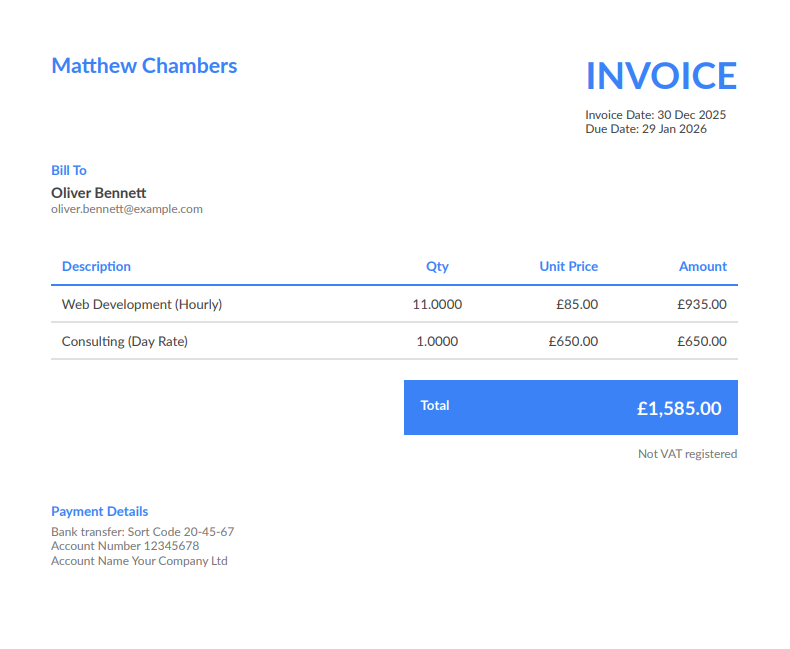
A well-structured invoice is easy to understand and process. Here's the typical layout:
Invoice Structure
Top section: Your business details, logo (optional), clearly marked "INVOICE"
Left side: Client details ("Bill To:" or "Invoice To:")
Right side: Invoice number, date, due date, any reference numbers
Middle section: Line items table with columns for description, quantity, rate, and amount
Totals section: Subtotal, VAT (if applicable), and total due — clearly highlighted
Bottom section: Payment details (bank account, sort code), payment terms, any notes
Step 4: Calculate totals correctly
Incorrect calculations look unprofessional and create payment delays. Here's how to calculate correctly:
Without VAT
- Calculate each line item: Quantity × Unit Price = Line Total
- Add all line items to get Invoice Total
With VAT (20% standard rate)
- Calculate each line item: Quantity × Unit Price = Net Line Total
- Add all line items to get Net Subtotal
- Calculate VAT: Net Subtotal × 0.20 = VAT Amount
- Add together: Net Subtotal + VAT Amount = Gross Total
Calculation Example
Line Items:
- Consulting: 5 days @ £450/day = £2,250
- Workshop preparation: 2 days @ £450/day = £900
Net Subtotal: £3,150
VAT @ 20%: £630
Total Due: £3,780
Step 5: Send the invoice
How you deliver the invoice affects how quickly you get paid:
Email: Most common method. Attach a PDF for professional appearance. Include a brief message confirming what the invoice covers and when payment is due.
Invoicing software: Send directly from your system. The client receives a professional email with the invoice attached. You get notified of delivery and can track whether it's been viewed.
Post: Rarely used now, but some clients (particularly government or larger corporates) may have specific delivery requirements.
Step 6: Track and follow up
Sending an invoice isn't the end of the process. You need to:
- Record the invoice in your system
- Note the payment due date
- Monitor for payment
- Follow up if payment is late
- Mark as paid when payment arrives
Without tracking, invoices slip through cracks. You forget to follow up, clients forget to pay, and money owed becomes money lost.
Common invoice mistakes to avoid
These errors create delays, confusion, and unprofessional impressions:
Missing information
Forgetting your VAT number, omitting payment terms, or leaving off client details. Check every invoice against the required fields list before sending.
Vague descriptions
"Professional services — £2,000" tells the client (and HMRC) nothing. Be specific: "Website redesign — homepage and 4 inner pages, including mobile responsive layout."
Calculation errors
Manual calculation mistakes look unprofessional and delay payment while the client queries the discrepancy. Use software that calculates automatically.
Duplicate invoice numbers
Each invoice must have a unique number. Duplicates create audit problems and confuse your records. Sequential auto-numbering prevents this.
Unclear payment terms
"Payment expected promptly" isn't a payment term. "Due within 30 days" or "Due by 15 March 2026" is clear and enforceable.
No payment details
If clients don't know where to send money, they'll delay until they ask. Include bank details (sort code, account number) on every invoice.
Delayed invoicing
Waiting weeks or months to invoice signals you don't need the money urgently. Invoice promptly and you'll be paid faster.
Using software vs manual invoices
You can create invoices manually in Word, Excel, or Google Docs. It works, but has significant drawbacks:
- You manage invoice numbering manually (easy to make errors)
- Calculations are manual (prone to mistakes)
- No automatic tracking of payment status
- Records scattered across files
- Tax summaries require manual compilation
Invoicing software handles all of this automatically. Your details are stored, invoice numbers increment, VAT calculates correctly, and payment tracking is built in. Most options are free for basic invoicing.
Time is money. If you're spending 20 minutes per invoice when you could spend 2 minutes, that's 18 minutes of lost billable time — every single invoice.
Frequently Asked Questions
Do I need to send an invoice for every payment?
For business-to-business sales, yes — invoices are expected and create proper records for both parties. For consumer sales, you don't always need an invoice unless asked, but keeping records of all sales is still required. VAT-registered businesses must issue VAT invoices for standard transactions.
Can I use Word or Excel for invoices?
Technically yes, but it's not recommended. Manual documents are prone to errors, don't auto-number, and make tracking payments difficult. As your business grows, manual invoicing becomes a significant time drain. Invoicing software is typically free for basic use and far more efficient.
What happens if I make a mistake on an invoice?
Never alter a sent invoice. Instead, issue a credit note to cancel the original, then create a new correct invoice. Keep records of all documents. This maintains the audit trail that HMRC expects and prevents confusion with your client.
How do I handle deposits and partial payments?
You can either: (1) invoice the deposit amount separately as 'Deposit for [project]', or (2) invoice the full amount and accept partial payment, tracking the balance due. Option 1 is cleaner for records. When final payment is due, issue another invoice for the remaining balance.
When should I send an invoice?
For project work: on completion or at agreed milestones. For ongoing work: at agreed intervals (weekly, monthly). For products: on delivery or despatch. Don't delay invoicing — the sooner you invoice, the sooner you get paid. Late invoicing also signals disorganisation.
What if a client disputes my invoice?
Respond promptly and professionally. Review your records — does the invoice match your quote or agreement? If you made an error, issue a credit note and corrected invoice. If the dispute is unfounded, provide documentation (signed quotes, email agreements) supporting your charges. Most disputes stem from unclear scope, which is why detailed quotes matter.