
What makes a good freelance invoice template?
A freelance invoice template should do two things: include every required field, and present information clearly. Fancy design is optional; clarity and compliance are not.
The best templates are ready to use with minimal customisation. You add your business details once, then fill in client and job specifics for each invoice. When you need to send a new invoice, you're not starting from scratch.
But templates have limitations. They don't auto-number invoices, track payments, or calculate VAT for you. For freelancers sending more than a handful of invoices monthly, these limitations add up quickly.
Essential sections of a UK invoice template
Every freelance invoice template needs these components. Miss any of them and your invoice may be incomplete for tax purposes or confuse your clients.
Header section
- Your business name: Your company name or trading name
- Your logo: Optional but professional
- "INVOICE": Clear document identification — don't make clients guess what this is
Your business details
- Full business address
- Contact email and phone
- Company registration number (if limited company)
- VAT registration number (if VAT-registered)
Client details ("Bill To")
- Client's business or individual name
- Client's full address
- Contact person (helpful but not required)
Invoice metadata
- Invoice number: Unique, sequential identifier
- Invoice date: When you're issuing the invoice
- Due date: When payment is expected
- Reference/PO number: Optional — include if client requires one
Line items table
The core of your invoice. Each row should include:
- Description: What you did or provided
- Quantity: Hours, days, units — whatever applies
- Rate: Price per unit
- Amount: Quantity × Rate
Totals section
- Subtotal: Sum of all line items
- VAT: Amount if applicable, with rate shown
- Total due: Final amount payable, clearly highlighted
Payment information
- Bank name
- Account name
- Sort code and account number
- IBAN/BIC for international payments (if needed)
- Alternative payment methods if offered
Footer notes
- Payment terms reminder
- Late payment policy (optional)
- Thank you message (optional but polite)
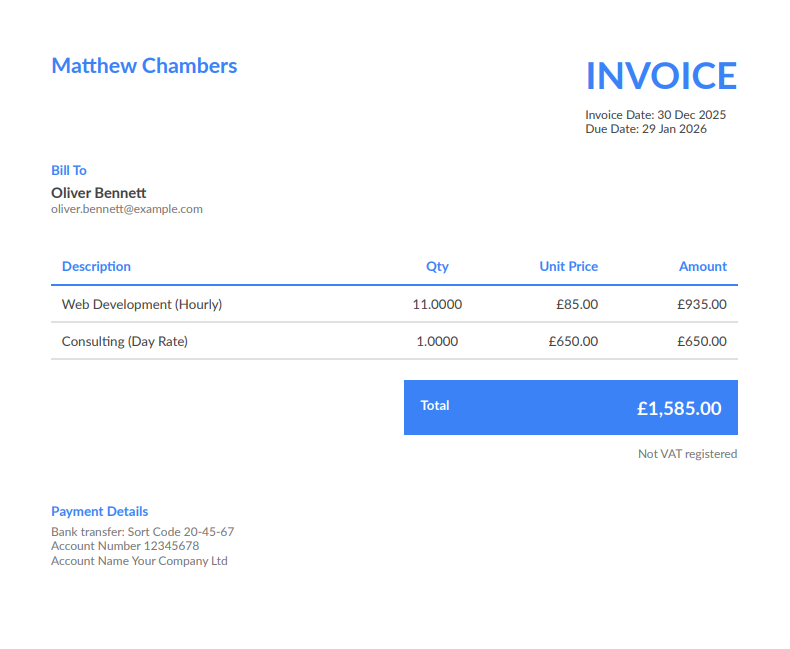
Example invoice layout
Here's how a properly completed freelance invoice looks:
INVOICE
From:
Amy Foster Design
42 Creative Lane
Bristol, BS1 5AA
[email protected]
VAT No: GB 111 2222 33
Bill To:
Bright Ideas Ltd
100 Innovation Street
London, EC2A 1BB
Invoice #: AF-2026-023
Date: 14 February 2026
Due: 14 March 2026
Description
- Brand identity design (logo, colours, fonts): £1,800
- Stationery templates (business card, letterhead): £450
- Brand guidelines document (12 pages): £550
Subtotal: £2,800.00
VAT @ 20%: £560.00
Total Due: £3,360.00
Payment Details:
Barclays Bank
Account: Amy Foster Design
Sort Code: 20-00-00
Account No: 12345678
Payment due within 30 days. Thank you for your business.
VAT vs non-VAT templates
Whether you need VAT on your template depends on your registration status:
Non-VAT template (under £90,000 threshold)
If you're not VAT-registered, your template is simpler:
- No VAT number field
- Totals section shows just subtotal and total (same amount)
- Consider adding "Not VAT registered" in small text to clarify
VAT template (registered)
VAT-registered freelancers need additional fields:
- VAT registration number in header
- Separate VAT line in totals (showing rate and amount)
- For invoices over £250: VAT per line item
Having separate templates prevents confusion. A VAT invoice sent by a non-registered freelancer is technically incorrect; a professional invoice from a registered freelancer missing VAT details is non-compliant.
Download template vs use software
Templates are a reasonable starting point, especially when you're testing freelancing or sending occasional invoices. But they have clear limitations:
What templates can do
- Provide a consistent format for invoices
- Ensure you don't forget required fields
- Look more professional than plain text invoices
What templates cannot do
- Auto-number invoices: You track and increment numbers manually
- Calculate VAT: You do the maths yourself
- Track payments: No system for marking invoices paid
- Store client details: You re-enter client info each time
- Send automatically: You export, attach, and email manually
- Generate tax summaries: Year-end totals require manual compilation
If you're invoicing regularly — even just 5-10 invoices per month — these limitations cost significant time. The 15 minutes per invoice you spend on admin is time not spent on billable work.
When to graduate from templates
Consider proper invoicing software when:
- You've used the same invoice number twice — invoicing software prevents this entirely
- You've made calculation errors — manual maths leads to mistakes
- You don't know what's outstanding — tracking requires a separate system with templates
- Tax time is stressful — compiling annual totals from scattered files takes hours
- Invoicing feels like a chore — you delay it because it takes too long
- You're sending more than 10 invoices monthly — volume makes manual work unsustainable
FreelancerHub handles all of this. Your details are stored, clients are saved, numbers auto-increment, VAT calculates automatically, and payment status is tracked. Creating an invoice takes under a minute instead of 15.
Writing effective invoice descriptions
The description in your line items matters more than you might think:
Too vague: "Consulting — £2,000"
Better: "Marketing strategy consulting — brand positioning workshop (half day) + competitor analysis report"
Too vague: "Design work — £800"
Better: "Homepage redesign including desktop and mobile layouts (2 revision rounds)"
Clear descriptions help clients remember what they're paying for, make approval faster, and create proper records if there's ever a dispute. They're also helpful for your own records at tax time.
Frequently Asked Questions
What format should I use for an invoice template?
Word documents (.docx) and Excel spreadsheets (.xlsx) are common for editable templates. For sending to clients, always convert to PDF to preserve formatting and prevent accidental changes. Many freelancers use HTML templates that print directly to PDF.
Can I create my own invoice template?
Yes, there are no legal requirements for invoice design or format — only for the information included. You can design your own template as long as it contains all required fields (invoice number, dates, your details, client details, itemisation, totals, and VAT information if registered).
Should my invoice match my other branding?
Ideally, yes. Consistent branding across proposals, invoices, and other documents reinforces your professional image. Use your logo, brand colours, and typography. That said, a plain professional invoice is better than a badly branded one — don't sacrifice clarity for design.
How often should I update my invoice template?
Update when your business details change (address, VAT status, bank details) or when you notice repeated questions from clients about your invoices. If a template causes confusion or errors, it's time for revision.
Are free invoice templates sufficient for a business?
Free templates work fine for occasional invoicing. But as invoice volume grows, manual templates become time-consuming and error-prone. Invoicing software automates what templates can't: sequential numbering, payment tracking, and tax summaries.
Can I use the same template for VAT and non-VAT invoices?
You can, but it's cleaner to have separate templates. VAT invoices need additional fields (VAT number, rate, amounts) that don't apply to non-VAT invoices. Showing empty VAT fields on non-VAT invoices can confuse clients.